
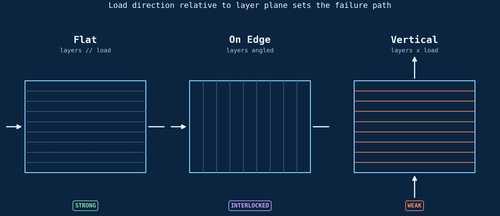
 The same part, three orientations: the load doesn’t change, but its angle to the weakest plane does.
Rotate a part fifteen degrees on the build plate before slicing, and you have changed almost everything about how it will fail, not just how it will print. Build orientation sets the direction of the weakest plane in a layer-built part, and that plane forms the same way in every process: heat moves out of freshly deposited material into whatever layer sits beneath it, and the strength of the bond that results depends on how much heat arrives and how fast it leaves.
In fused deposition modeling, bond quality tracks a variable most orientation discussions skip: printing path direction. A recent study on FDM-printed PEEK found that path direction, not build orientation, explains most of the spread: specimens printed along a W or T path all measured under 5 percent elongation at break, while switching to an L path lifted that dramatically, to 46.25 percent for a part built in the thickness direction (T-L) and 96 percent for the same L path built in the width direction (W-L), even though the two L-path builds shared nearly identical elastic modulus and yield strength, around 2.6 GPa and 65 MPa respectively Printing-Path-Dominated Anisotropy in FDM-PEEK. Build orientation still decided which end of that range a part landed on: W-direction builds fused more completely than T-direction builds along the same path, roughly doubling ductility for no cost in strength. Orientation only affected shear strength once the print path itself ran across the part’s width, where it produced 38.8 MPa in one direction versus 32.4 MPa in the other. Path geometry sets the ceiling on what’s achievable; orientation decides whether a given part gets there.
Zoom out from any single material system and the same thermal logic produces the rule of thumb most practitioners already carry around: parts printed flat, with layers running parallel to the load, can test roughly 50 percent stronger than the same geometry printed vertically, because interlayer bonds are consistently weaker than the bulk material within a layer 3DSPRO on print orientation and anisotropy. Fatigue life drops even further in the vertical direction, since a crack only has to travel along one weak interface rather than tear through solid polymer. None of this makes vertical printing a mistake. It makes anisotropy a design parameter that has to be pointed at the expected load on purpose, not discovered by accident during a failure investigation.
The clearest demonstration of orientation as a deliberate design lever, rather than a defect to be managed around, comes from multimaterial printing. A 2026 study on PLA and TPU interfaces compared parts printed flat, with the material interface running parallel to the build plate, against parts printed on edge, with that interface running through it. On-edge specimens showed up to a 389 percent increase in interfacial toughness over flat ones, driven by a purely geometric effect: the on-edge orientation roughly doubles the number of material rasters crossing the interface, from about 100 to 200, producing an interleaved structure that locks the two materials together mechanically Nature: printing orientation and interfacial mechanical design. No chemistry changed between the two cases. Rotating the part did all the work.
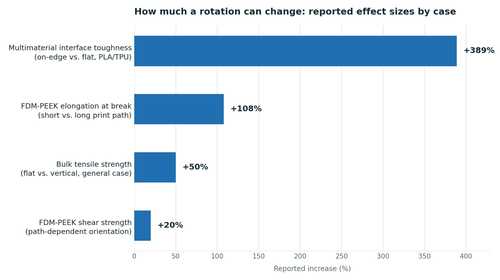 The size of the effect depends entirely on what’s being measured, but in every case it is large enough to matter.
Orientation also decides which surfaces need support and how rough they end up afterward. Any down-facing surface shallower than roughly 45 degrees suffers from the staircase effect, where each layer’s edge shows up as a visible step instead of a continuous slope, and a study of down-facing surface quality found that the Sz roughness parameter, which captures peak-to-valley height, separates good and bad surfaces far more reliably than the average roughness value Sa, which can look nearly identical across surfaces that behave very differently in service 3DPrint.com on down-facing surface roughness.
Given how much rides on the angle, it is worth noticing how little of the software stack optimizes for it directly. Slicer and prep tools have gotten good at automating the downstream consequences of whatever orientation a part happens to land in. Formlabs’ PreForm generates supports automatically, and its newer touchpoints run up to 50 percent smaller than earlier versions Formlabs PreForm. But automated orientation selection itself is still mostly a research problem, one that has to weigh support volume, surface finish, build time, and mechanical strength against each other simultaneously Design for Additive Manufacturing: Automated Build Orientation Selection and Optimization. Optimizing for build time alone is a solved problem. Optimizing for the mechanical properties a part will actually see in service, across a load case the software cannot always guess, is not, and until that gap closes, the orientation decision stays exactly where it started: with the engineer’s hand, before the slicer ever opens.